I came across a Windows Server 2016 VM that had Veeam Agent installed for backups. The backup destination was a Synology NAS dedicated for backups running DSM 6.1.5-15254 Update 1 (most current version at the time of writing this). The backups were not completing, and in Event Viewer, each failure would log the following event:
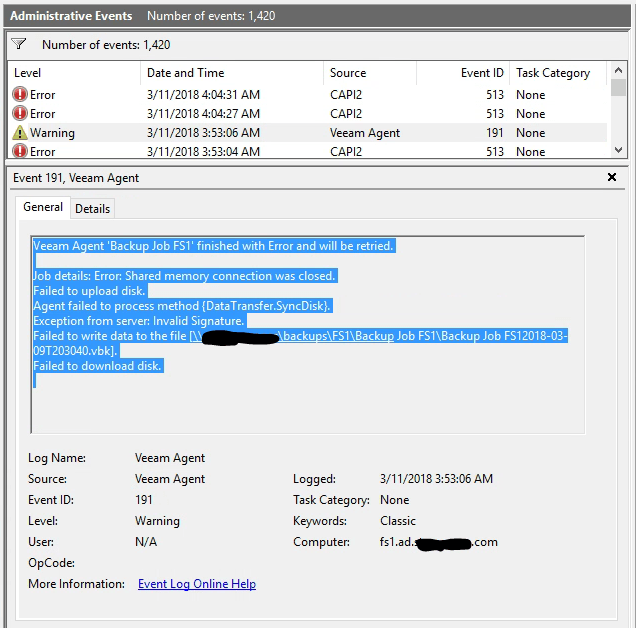
Veeam Agent 'Backup Job FS1' finished with Error and will be retried.

Job details: Error: Shared memory connection was closed.
Failed to upload disk.
Agent failed to process method {DataTransfer.SyncDisk}.
Exception from server: Invalid Signature.
Failed to write data to the file [\\nas\backups\FS1\Backup Job FS1\Backup Job FS12018-03-11T203041.vbk].
Failed to download disk.
The Invalid Signature part stuck out to me. I started looking into SMB signing and found this Microsoft page: https://support.microsoft.com/en-us/help/2686098/system-error-2148073478-extended-error-or-invalid-signature-error-mess
The article states that some third party file servers are not compatible with SMB signing. The SMB client expects a signed response, but the 3rd party file server never gives it to the client, so the transfer fails.
I logged into the Synology NAS, went to Control Panel > File Services > SMB > Advanced settings.
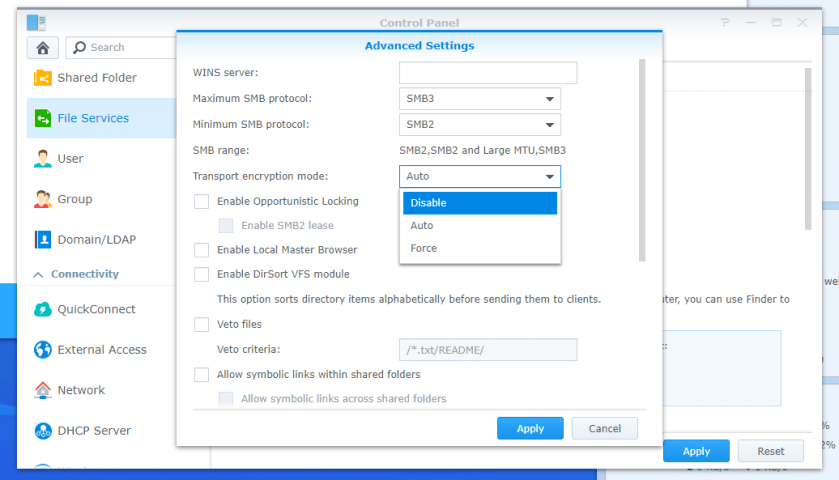
Transport Encryption mode was set to Force, so I set it to Auto. Now the Veeam Agent backups are completing successfully!

 Nigmenog.com
Thank you for this. I have the same issue, I just wish this wasn’t the only fix. I’m opening a ticket with Veeam to see if they have any other suggestions.
LikeLike